


|
FFmpeg Integration for DekTec Devices Use FFmpeg for real-time SDI and SMPTE ST 2110 input and output via DekTec devices. DekTec support is available in the
|
Key Additions to FFmpeg
| ffmpeg |
Added -f dektec for real-time SDI/2110 input/output via DekTec devices.
|
| ffplay |
Added -f dektec to show an SDI/2110 stream from a DekTec device
in a window.
|
| .sdi file format | New format for SDI storage. Supported by ffmpeg, ffplay and FFmpeg libraries. |
| FFmpeg libraries |
Added real-time DekTec support and .sdi file format, for custom apps. |
Get Started
- Install the DekTec driver for your card: Downloads → SDK.
-
Download
ffmpeg,ffprobeandffplayfor Linux or Windows x64 from the latest release. -
List your cards' ports:
ffmpeg -sources dektec
Further resources:
- DekTec-specific command-line options
- Sources and build instructions for Linux
- Sources and build instructions for Windows
-
Use it from vcpkg:
the
ffmpeg-dektecport in DekTec's vcpkg registry - Source code on GitHub
Supported DekTec Adapters
Video - Supported Formats
| 4K | 2160p, over a single 12G-SDI link |
| HD/3G | 720p, 1080i, 1080p, 1080psf |
| SD | 480i, 576i |
| Frame rate |
23.98, 24, 25, 29.97, 30 Hz 50, 59.94, 60 Hz |
Audio - Supported Formats
| Format | PCM |
| Sample rate | 48 kHz |
| Sample size | 20-, 24-bit |
PC Support
| Linux | ≥4.x, 5.x |
| Windows | 10, 11; Server 19, 22, 25 |
| Processor | Core i7 Or equivalent AMD CPU |
Features
- SDI and SMPTE 2110 I/O: Receive and transmit live video and audio through supported DekTec devices.
- Windows and Linux: Use the command-line tools or integrate FFmpeg libraries into your own application on either platform.
- Open Source: Built on CDTAPI, DekTec's open-source C API. Source code and ready-built binaries are available.
-
SDI File Support:
Read and write raw SDI streams in DekTec's
.sdifile format.
Applications
- Live Encoding and Decoding: Encode incoming streams or decode media for output through DekTec devices.
-
Video and Audio Monitoring:
Use
ffplayto view live video and listen to audio from SDI or SMPTE ST 2110 inputs. - SDI-to-IP Gateways: Route video and audio between SDI and SMPTE ST 2110 interfaces.
- Custom Applications: Combine FFmpeg's media processing with DekTec I/O in your own software.
FFmpeg Command-Line Examples
Explore these representative ffmpeg command-line examples to get a feel for the
extensive functionality of our FFmpeg integration.
These examples are just the tip of the iceberg - the ffmpeg tool
provides countless command-line options. Furthermore, combining FFmpeg libraries
with DekTec I/O opens up a world of possibilities for crafting your own bespoke
applications.
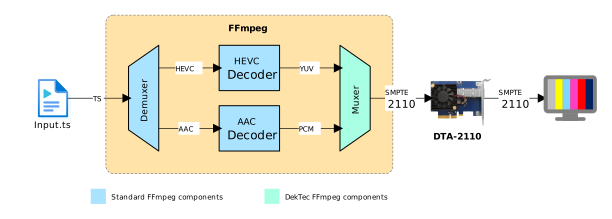
The picture below shows a configuration where the ffmpeg tool is used to stream a service, from a transport-stream file, as SMPTE-2110 video and audio streams via a DTA-2110 card.
Command-line:
ffmpeg -i input.ts -url:v 239.0.0.5:5678 -url:a 239.0.0.6:5680 -f dektec 2110000054
Alternatively, stream SDI via DTA-2178 port 4:
ffmpeg -i input.ts -f dektec 2178000132:4
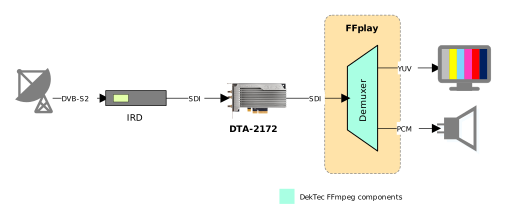
To view and listen to video and audio received with a DekTec card, use ffplay. This is illustrated in the picture below, where ffplay is used to view the contents of an SDI signal received with a DTA-2172 card.
Command-line:
ffplay -f dektec -i 2172000209
Alternatively, receive SMPTE-2110 streams with a DTA-2110:
ffplay -url:v 239.0.0.5:5678 -url:a 239.0.0.5:5680 -f dektec -i 2110000054
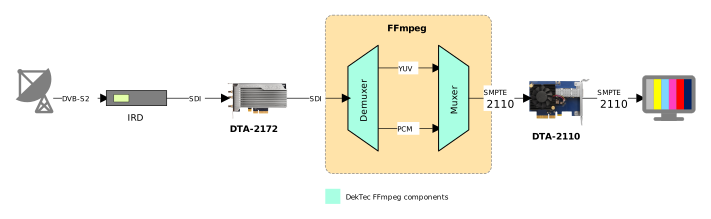
The example below combines the previous two examples into an SDI-to-SMPTE-2110 gateway. This time the ffmpeg tool is used to route the video and audio extracted from the SDI signal received with a DTA-2172 to a DTA-2110, which transmits them as ST 2110-20 and ST 2110-30 video and audio IP streams.
Command-line:
ffmpeg -f dektec -i 2172000209 -url:v 239.0.0.5:5678 -url:a 239.0.0.6:5680 -f dektec 2110000054
A 4K example: play a 2160p50 file out through a DTA-2178 port as 12G-SDI:
ffmpeg -i input_2160p50.mp4 -f dektec 2178000132:1
Supported DekTec Adapters
Below is a list of DekTec products that work well with our FFmpeg integration. Please note that while these have been checked for compatibility, results may vary based on your specific usage and configuration.
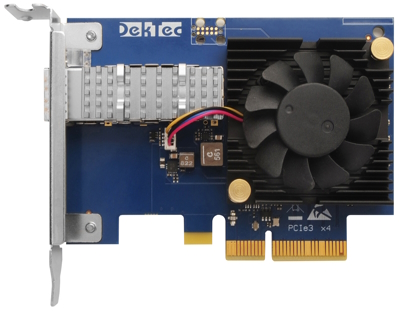 |
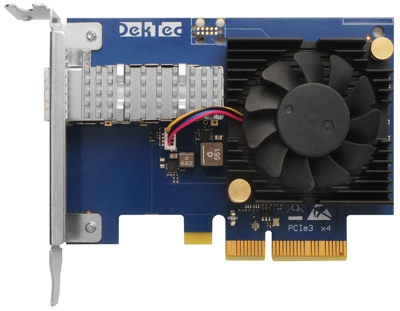
DTA-2110 – 10G SmartNIC Optimized for SMPTE 2110
The DTA-2110 is a high-performance PCIe card that enables receiving or
transmitting of SMPTE ST 2110 audio and video streams into or out of FFmpeg.
|
 |
DTA-2125 – 25G SmartNIC Optimized for SMPTE 2110 The DTA-2125 offers the same functionality as the DTA-2110, but for 25G Ethernet environments. |
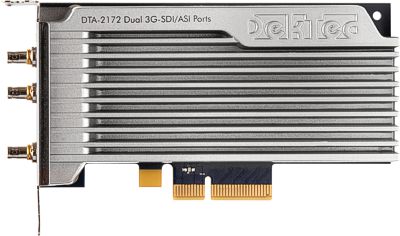 |
DTA-2172 – Dual 3G-SDI/ASI Ports for PCIe
Each of the two ports enables receiving or transmitting an SDI stream (SD, HD,
or 3G) into or out of FFmpeg. With |
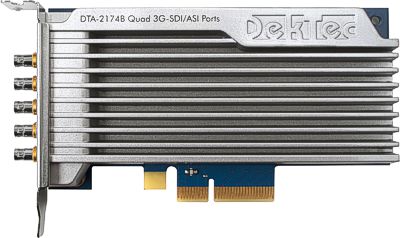 |
DTA-2174B – Quad 3G-SDI/ASI Ports (1x12G) for PCIe
Each of the four ports enables receiving or transmitting an SDI stream
(SD, HD or 3G) into or out of FFmpeg, and the 12G port carries 4K (2160p)
over a single link.
For viewing purposes, |
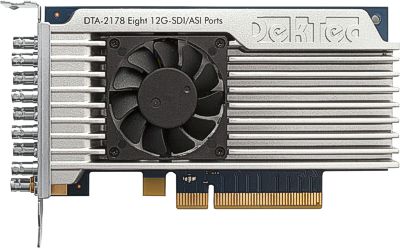 |
DTA-2178 – Octal 12G-SDI/ASI Ports for PCIe
Each of the eight ports enables receiving or transmitting an SDI stream
(SD, HD, 3G or 12G) into or out of FFmpeg, including 4K (2160p) over a
single 12G link.
For viewing purposes, |
